Now in early access · 50 slots left

One inbox for all your work notifications.

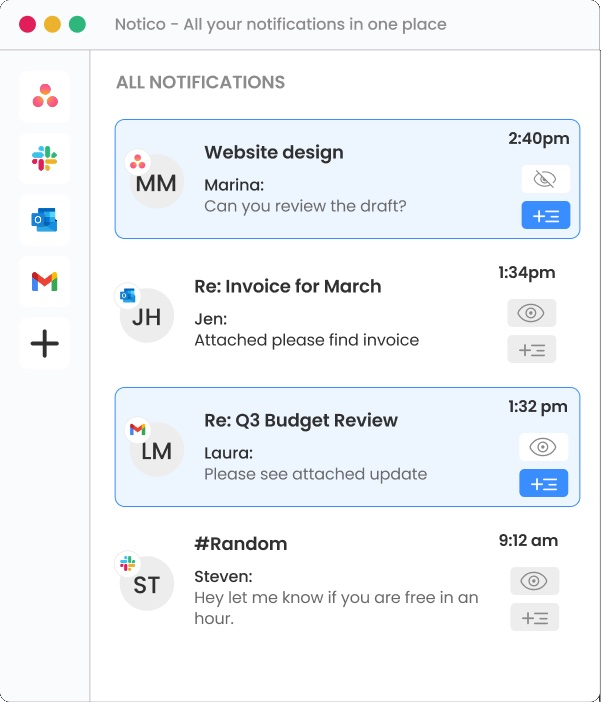
Your unified inbox for Slack, Gmail, Outlook and Asana. Every alert digested, prioritised, and ready to act on. What's urgent, what can wait, what needs a reply. No more work before work. Just the work.

"We don't manage your work. We digest it for you."

Free during early access · No credit card · 50 spots left

Works with Gmail Gmail Live Outlook Outlook Live Slack Slack Live Asana Asana Live Coming soon Jira Jira Figma Figma Monday.com Monday.com ClickUp ClickUp WhatsApp WhatsApp Motion Motion
What Noticue does

Your notifications, digested

Every alert across every connected app, understood and prioritised before you open a single one.

One unified inbox

Slack messages, Gmail threads, Outlook emails and Asana tasks arrive in one feed. No switching, no checking, no missing anything.

AI prioritisation

The AI reads across every notification and surfaces what is urgent, what can wait, and what needs a reply. You know before you open anything.

Coffee Briefing

Every morning, an AI briefing catches you up on everything that arrived overnight across all your apps. Ready in under 45 seconds.

Who Noticue is for

One platform. Two ways to take back control of your notifications.

Whether you are an individual drowning in notifications or a company losing time to communication overload across an entire team, Noticue digests it all for you. Join the early-access waitlist for the version that fits you.

Available soon

Noticue for individuals

A unified notification inbox for freelancers, remote workers and busy professionals. Noticue digests Slack, Gmail, Outlook and Asana into one intelligent feed, so you start every day already knowing what matters, what can wait, and what needs a reply.

  • One unified inbox across all your work apps
  • Daily AI Coffee Briefing in under a minute
  • Smart priority sorting and cross-app search
  • Free for the first 200 early-access members
Join the individual waitlist
In development

Noticue for teams & companies

A unified notification inbox for growing companies and remote teams. Give everyone shared visibility across the tools your business already runs on, so no critical update, customer message or deadline ever slips through the cracks.

  • Team-wide unified notification inbox
  • Insights into when your team is getting overwhelmed
  • Early alerts for phishing, delays and miscommunication
  • Integrations with the tools your company uses
Join the company waitlist
For freelancers & contractors

Turn notification overload into hours back in your week

5hrs

Reclaimed every week once every notification lands in one inbox

Back in your billable time

~20hrs

Of focus time back each month, instead of hopping between apps

That is half a work week

1

Unified notification inbox in place of the six apps you check all day

Slack, Gmail, Outlook, Asana and more

0

Client messages lost between your tools and your inbox

Nothing slips through

For teams

See what a unified inbox saves your team each year

Notification overload quietly taxes every teammate, and across a team it compounds fast. A unified notification inbox that ranks what matters, a single aggregator for Slack, Gmail, Outlook and Asana, puts that time back. Adjust the sliders to see how much, per year.

One missed deadline ripples across a whole team. Noticue helps the right alert reach the right person in time to act.

Team savings calculator

€31,250

your team could reclaim per year

Based on each teammate getting back about 30 min a day across 250 working days. Illustrative estimate.

Features

Everything you need to tame notification overload

Every feature is built to solve a specific, documented pain point, from urgent messages buried in Slack to project threads scattered across five different apps.

Unified Notification Inbox

Slack, Gmail, Outlook, Asana and more, all your work notifications in one feed, one search bar, one place to triage everything.

AI POWERED

AI Chat

Ask Noticue anything. Spot phishing emails, organise your whole day, find out what is urgent. The AI reads your notifications so you don't have to.

Maybe Related

Open any notification and instantly see everything connected, filter by sender or by subject to follow the whole thread.

AI POWERED

AI Priority Report

Ask Noticue's AI for a priority report anytime. It separates the urgent from the informational and tells you what needs you first.

Cross-App Search

Search every connected app at once. Find any notification by sender, keyword, subject or project, whatever platform it came from.

Go to Source

One click takes you to the original notification in the source app. Noticue organizes, you act where you already work.

☕ Coffee Briefing · AI Powered

Your AI morning briefing. Under 1 minute. Every day.

Every morning, Noticue's AI prepares a personal audio briefing, what happened while you were away, what's urgent, and where each project stands across every app you use. Grab your coffee, press play, and you're caught up before your first meeting.

The only AI morning briefing that reads across Slack, Gmail, Outlook and Asana simultaneously, so you start every day already knowing what is urgent, what can wait, and what needs a reply.

Get your first briefing
Today's Coffee Briefing00:00 / 00:40
  • 2 urgent items need a reply before noon
  • The Q3 contract thread is still waiting on you
  • Design review moved up, now due Friday
Your message content never leaves your apps We read notification metadata only End-to-end encrypted connections to every app Revoke access to any app in one tap, any time Your data is never sold or shared with third parties Your message content never leaves your apps We read notification metadata only End-to-end encrypted connections to every app Revoke access to any app in one tap, any time Your data is never sold or shared with third parties
Integrations

Manage Slack, Gmail, Outlook & Asana in one place

Connected to your existing tools today. More integrations, including Jira, Figma, Monday.com, ClickUp, WhatsApp and Motion, are coming soon.

GmailGmailLive
OutlookOutlookLive
SlackSlackLive
AsanaAsanaLive
JiraJiraSoon
FigmaFigmaSoon
Monday.comMonday.comSoon
ClickUpClickUpSoon
WhatsAppWhatsAppSoon
MotionMotionSoon
Built with users

Built with 50+ professionals who live this daily

We didn't build Noticue in a vacuum. We interviewed and worked with over 50 knowledge workers, remote teams and freelancers, mapping exactly where notification overload hurts most.

📊 Product Managers 🎨 Designers 💻 Developers 📣 Marketing Teams 🏢 Operations Leads 🧑‍💼 Freelancers 🌍 Remote Workers
FAQ

Common questions about Noticue

Everything you need to know about how Noticue works, what it connects to, and how it keeps your data safe.

What is Noticue and how does it work?

Noticue is an AI-powered notification management app that connects your work tools, Slack, Gmail, Outlook, Asana and more, into a single unified inbox. Instead of jumping between apps, you see all your work notifications in one place. An AI layer groups related notifications, detects urgency, and prepares a personal morning audio briefing called the Coffee Briefing every day.

How is Noticue different from just using Slack or email?

Slack manages messages. Gmail manages email. Asana manages tasks. Every tool manages itself. That is exactly the problem. You are left doing the connecting, the comparing, the deciding what matters across all of them at once. That is work before work. Noticue does not manage your notifications. It digests them for you. Think of it the way you think of Google: Google does not decide what exists on the internet, it just makes sense of it and tells you what is relevant. Noticue does the same thing for your work communications: every alert across Slack, Gmail, Outlook and Asana understood, prioritised, and ready to act on, so the first thing you do each day is the work itself, not the triage that precedes it.

Can I reply to messages from inside Noticue?

Noticue is a notification-organizing platform, not a replacement inbox, and that's intentional. Many notifications are purely informational and simply need to be seen, filed or dismissed. For the ones that require action, one click on "Go to Source" takes you directly to the original app. This keeps Noticue focused on helping you understand and organize everything coming in.

Is my data safe when I connect my work accounts?

Yes. Noticue uses secure, encrypted connections and focuses on notification metadata to power your inbox and AI features like the Coffee Briefing and Priority Report. Your data is never sold or shared, and you can revoke access to any connected app at any time from your settings.

What is the Coffee Briefing feature?

The Coffee Briefing is Noticue's AI-generated morning audio summary, under a minute long. It focuses on what actually matters, items from the past few days that need attention, tasks you may have postponed, follow-ups you haven't sent, or threads still waiting on a response. Purely informational notifications are filtered out. Think of it as a personal assistant who has reviewed everything and tells you only what you need to hear before your day begins.

When will Noticue be available and how much will it cost?

Noticue is currently in early access. The first 200 users who join the waitlist get free access during the launch period. Pricing details will be announced to the waitlist first, join now to lock in early-access terms.